Are there bees around here?...
One test that many programmers are asked to do at some point in their life is FizzBuzz.
If you haven't heard of it - The problem of FizzBuzz is this (stolen from HackerRank):


If you haven't heard of it - The problem of FizzBuzz is this (stolen from HackerRank):
- Write a short program that prints each number from 1 to 100 on a new line.
- For each multiple of 3, print "Fizz" instead of the number.
- For each multiple of 5, print "Buzz" instead of the number.
- For numbers which are multiples of both 3 and 5, print "FizzBuzz" instead of the number.
I said last time that I was going to start with a clumsy solution so here is my 'phoning it in' version of pseudo-code for this (let's call it version 1):
- Loop through the numbers from 1 to 100 and put that number into a variable called 'num'
- If 'num' is evenly divisible by 3
- Print 'Fizz'
- Else
- If 'num' is evenly divisible by 5
- Print 'Buzz'
- Else
- If 'num' is evenly divisible by both 3 and 5
- Print 'FizzBuzz'
- Else
- Print the number
Wait a sec, there is a problem there. The program will never print 'FizzBuzz'!
The reason for that is as soon as it is divisible by three - It will print out 'Fizz' and go on to the next number!!!!
Let's try that again - we need to check for '3 and 5' first (let's call this version 2):
- Loop through the numbers from 1 to 100 and put that number into a variable called 'num'
- If 'num' is evenly divisible by 15 (that would be the same as checking for 'both 3 and 5' separately)
- Print 'FizzBuzz'
- Else
- If 'num' is evenly divisible by 3
- Print 'Fizz'
- Else
- If 'num' is evenly divible by 5
- Print 'Buzz'
- Else
- Print the number
Much better - now it will actually do what it is supposed to!
But could we do better? Spoiler alert - yes.
How about we use a variable to store what we expect to print. Each time through, we'll start out with the assumption that we will print the number. Then, we'll do the checks to find out if we actually need to print either 'Fizz', 'Buzz', or 'FizzBuzz'. Here is how that looks (let's call this version 3):
- Loop through the numbers from 1 to 100 and put that number into a variable called 'num'
- Store the number in a variable called 'say' in case we are going to print it
- If 'num' is evenly divisible by 15
- Store 'FizzBuzz' in 'say'
- Else
- If 'num' is evenly divisible by 3
- Store 'Fizz' in 'say'
- Else
- If 'num' is evenly divisible by 5
- Store 'Buzz' in 'say'
- Print whatever is in 'say'
This is a bit better than the first (actually working version) because it separates figuring out what to print from the actual printing. And...it lays a path toward an even better version. It involves remembering our first failed attempt and adding in the 'store the message in a variable' bit. You see, we're checking whether the number is divisible by 3 and 5 twice. One time each by themselves and then a second time together. Take a look at this (we'll call this version 4):
- Loop through the numbers from 1 to 100 and put that number into a variable called 'num'
- Store '' (an empty string) into a variable called 'say'
- If 'num' is evenly divisible by 3
- Add 'Fizz' to the end of 'say'
- If 'num' is evenly divisible by 5
- Add 'Buzz' to the end of 'say'
- If 'say' equals ''
- Set 'say' to 'num'
- Print 'say'
Anyone else getting a tingle? This version has a couple of nice features:
- We only test for divisibility by 3 and 5 once
- No more Else's - the code is flatter and simpler to understand
There hasn't been any actual code up until now - just for fun, let's see what this looks like in JavaScript. Even if you haven't worked with JavaScript (or even any other language) you will probably be able to read and understand it with this little bit of JavaScript training:
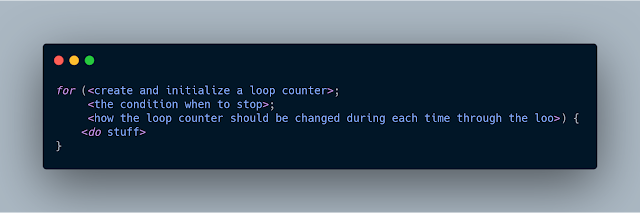
A basic 'for' loop has the following syntax:

Here are some math symbols that I will be using and what they mean:
- = : Assign a value to a variable
- == : Check whether two things are equal
- <= : Less than or equal to
- % : Modulus - this means the remainder after dividing
- ++ : Increment by one
Also, JavaScript uses opening and closing braces ('{' and '}') to indicate where a block of code starts and ends. If there is only one line in the block - you don't need to use the opening and closing braces.
And one last thing, if you want to print something out:
- console.log(<something that you want to print>)
Version 1:

Remember, this is the version that will not work because you can never get to see if the number is divisible by 3 and 5.
Version 2:

Here is the first version that will work because it will check if the number is divisible by both 3 and 5 before checking them individually.
Version 3:

This time, we're storing the value that we are going to print in a variable called 'say'. We start out saving the number in 'say' then change it if we need to. As you can see, there is only one place where we actually print something in the loop.
Version 4:

Finally, here is the version where we cut down on how many times we need to check for division by 3 and 5.
Here is a bonus version though that will give you a clue on how different programming languages can be made so that it is easier for programmers to write code with less typing. Even though these tools can be used - make sure you are smart about when you do. They can make your programs harder to read. In real life you should probably never write a program that looks like this (it is possible to make it even harder to read) even though it does the exact same thing:

I hope you enjoyed this little trip though FizzBuzz and this glimpse at JavaScript. This blog is not meant to teach you any language. Instead, it is meant to help you get comfortable in thinking about programming. From here on though there will probably be some code in one or more languages. I will try to make sure that I never show code that you could not puzzle out with a small number of clues (like I gave before these examples).
Next time we'll start on data structures with the Array (and perhaps a couple others that you can emulate using an array). There might be some code. We'll just have to wait and see...
Comments
Post a Comment